
OPA integration
Point Exo at your Open Policy Agent server and it asks OPA before gated actions: running tools, VM and Kubernetes shells, MCP delivery, LLM gateway traffic. Your policies stay in your OPA, in your Rego, on your network.
Many teams already keep their rules in Open Policy Agent. Instead of rewriting them as runtime policies, connect the OPA server itself. Exo consults it on every gated action and applies the verdict alongside the built-in policy engine. A deny from your OPA wins over anything else, and your existing runtime policies keep working unchanged.
How queries reach your OPA
Exo does not import or sync your policies. It sends each gated action to your OPA server as a decision query and enforces the answer at the layer the action passes through.
You don't need to open your OPA server up to make this work, not even to Exo. The Exo operator running inside your deployment talks to it instead, over your own network, and relays each decision back to the platform over the connection it already holds. That gives you three things:
- The OPA URL can be private: a cluster service, a VM on your VPC, even a firewalled host. Nothing about it needs to be reachable from the internet.
- There are no Exo source addresses to allowlist. Your firewall never sees Exo, only your own cluster.
- Every query arrives from your deployment's address, so your OPA's own request log shows exactly what Exo asked and when.
This needs an operator new enough to relay OPA queries. Step 1 of Connecting it to Exo covers the update.
Connecting it to Exo
If you're not running an OPA server yet, use OPA's own quickstart to get one running locally in a couple of minutes. Otherwise, skip straight to the steps below.
- Update the operator. Open your deployment's connect dialog and run the commands under Update the connector, or follow the upgrade guide. Only needed if it predates OPA relaying: if that's the case, saving the connection later will prompt you to upgrade first, so it's easiest to do now.
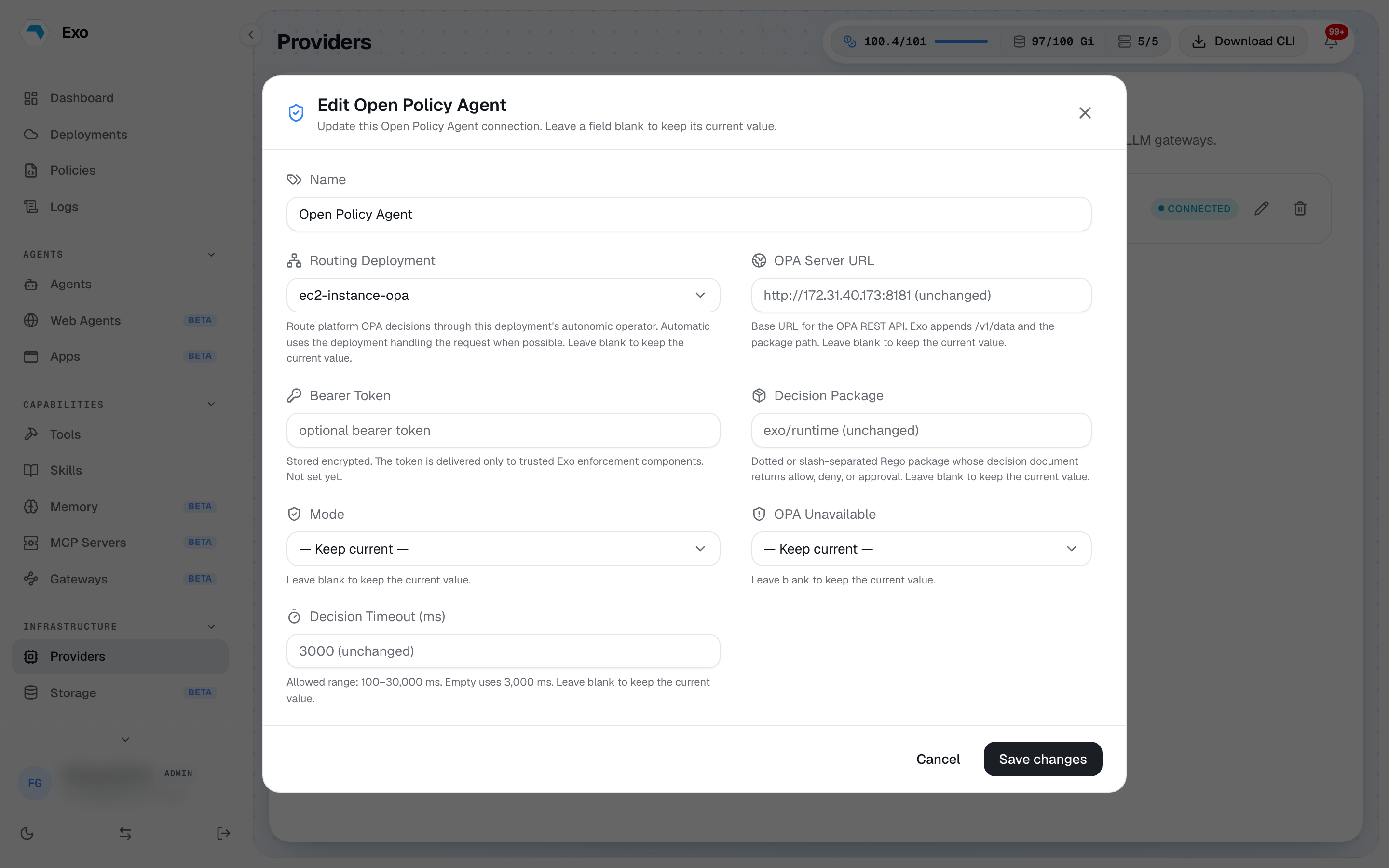
- Open Providers → Integration and pick Open Policy Agent from the Security section. A workspace has one active OPA connection; edit or delete it to change or disable enforcement.
- Fill in the connection using the fields below, then save.
| Field | What it is |
|---|---|
| OPA Server URL | Base URL of the OPA REST API, as reachable from your deployment. Private addresses are fine. Exo appends /v1/data and the package path. |
| Routing Deployment | Required. Which deployment's operator carries the platform's questions to your OPA. It picks the messenger, not the scope: the connection always governs every deployment in the workspace, and every operator still checks its own shells against the URL directly. If the routing deployment goes offline, platform-side checks follow the OPA Unavailable setting. |
| Bearer Token | Optional. Sent on every decision query, stored encrypted, and delivered only to Exo's own enforcement components. |
| Decision Package | The Rego package Exo queries. Dot and slash forms name the same package: exo.runtime and exo/runtime both work. Default exo/runtime. One package, not one rule set: it can import and combine any number of others, so aggregation lives in your Rego, not in Exo. |
| Mode | Enforce decisions, or monitor only: evaluate and log, never block. Start in monitor. |
| OPA Unavailable | What to do if OPA can't be reached: block everything until it's back (fail closed, the default), or let everything through and raise an alert (fail open). More on this in Fail open vs fail closed below. |
| Decision Timeout (ms) | How long a query may take before the OPA Unavailable setting kicks in. Default 3,000, range 100 to 30,000. |
Saving probes the endpoint through your operator and warns if it cannot be reached, so a typo in the URL never silently becomes a workspace-wide deny. The deployment must be online for the probe to run.
The request and response
For each gated action Exo sends a POST to <url>/v1/data/<package>/decision with a single input document:
1{"input": {2 "kind": "tool_exec",3 "pep": "backend",4 "tenant": {"id": "..."}, "user": {"id": "..."},5 "tool": {"ref": "default/prod-db", "name": "prod-db", "type": "postgres"},6 "command": "drop table users",7 "statements": ["drop table users"],8 "agent_run": false9}}kind says what is being decided and pep names the Exo component that asked. Fields vary by kind; the table below shows what lands in statements on each surface. Exo reads one object back:
1{"result": {2 "allow": false,3 "action": "deny",4 "rule": "sql_drop",5 "reason": "DROP statements are not allowed"6}}Your package must define a rule named decision that returns this shape; the last segment of the query URL is that rule's name. action is deny, and any other value is also treated as deny. The reason and rule you write travel with the refusal into the user's terminal, the agent's error message, and the audit record, exactly as written.
A starter policy
1package exo.runtime2 3import rego.v14 5# Deny destructive SQL through database tools.6violations contains v if {7 input.kind == "tool_exec"8 input.tool.type == "postgres"9 some s in input.statements10 regex.match(`(?i)^\s*drop\s+(table|database|schema)`, s)11 v := {"action": "deny", "rule": "sql_drop",12 "reason": "DROP statements are not allowed"}13}14 15# Deny kubectl delete everywhere.16violations contains v if {17 input.kind in {"tool_exec", "shell_command"}18 some s in input.statements19 startswith(lower(s), "kubectl delete")20 v := {"action": "deny", "rule": "kubectl_delete",21 "reason": "kubectl delete is denied"}22}23 24# The default must be defined: an undefined decision25# document is an error, never an allow.26denies := [v | some v in violations; v.action == "deny"]27 28decision := object.union({"allow": false}, denies[0]) if count(denies) > 029 30else := {"allow": true}The policy uses import rego.v1, so it needs OPA v0.59 or newer. Load it into your OPA server and try it before pointing Exo at it:
curl -X PUT your-opa-server:8181/v1/policies/exo --data-binary @exo.rego
curl -s your-opa-server:8181/v1/data/exo/runtime/decision \-d '{"input":{"kind":"tool_exec","tool":{"type":"postgres"},"statements":["drop table users"]}}'
What your rules see
Writing good rules means knowing what lands in statements for each surface:
| Surface | What statements contain | When it is checked |
|---|---|---|
| Kubernetes and SSH tools | The shell command being run | On each non-interactive run, and when a session opens |
| Database tools (postgres, mysql, ...) | The raw SQL sent to the tool | On each run |
| VM, ECS, and Kubernetes agent shells | Each command line | Line by line while the session runs |
| Tool shell sessions (interactive) | Empty; command is "" | Once, when the session opens |
MCP calls and LLM gateway traffic are checked too, just not through statements: they carry their own fields (mcp.server, llm.model, and so on) for the same reason, so your rule can match on what makes sense for that surface.
Inside a running interactive session, the tool's own permissions and session recording take over. To control who gets an interactive session at all, write a rule that matches an open, which is simply a tool_exec query with no statements:
1violations contains v if {2 input.kind == "tool_exec"3 input.tool.type == "kubernetes"4 count(input.statements) == 05 v := {"action": "deny", "rule": "no_interactive_k8s",6 "reason": "interactive kubernetes sessions are not allowed"}7}Policy edits apply on the next query. Update the Rego in your OPA and the very next command is judged by the new rules, with no change on the Exo side.
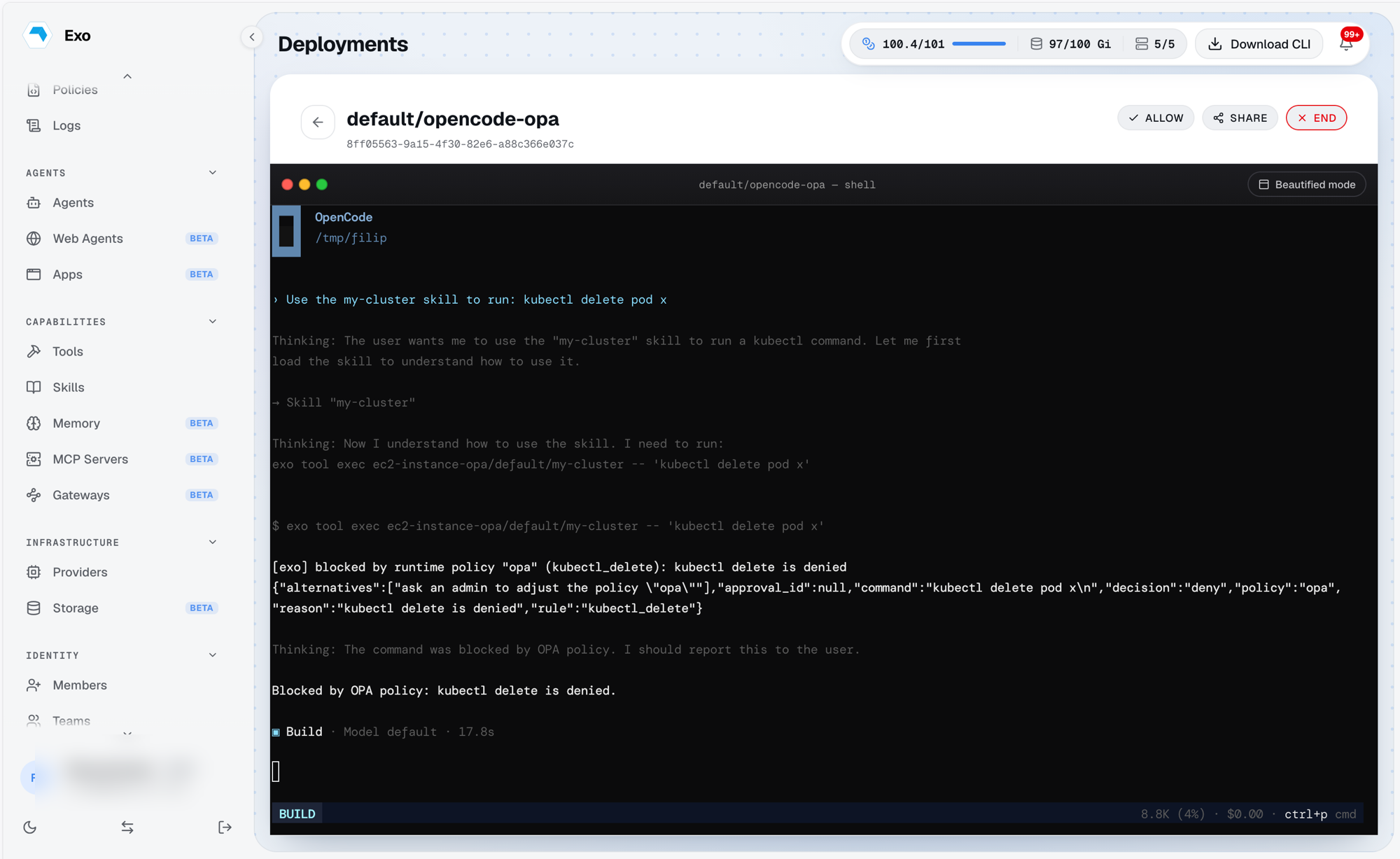
Agents are governed the same way. When an agent reaches for a governed tool, the decision travels back into its session as plain instructions it can act on, and the attempt lands in the decisions feed like any other:
Fail open vs fail closed
When OPA is unreachable, times out, or returns an undefined decision, the OPA Unavailable setting decides what happens. Fail closed (the default) denies the gated action. Fail open allows it and raises a policy alert so the outage is visible without stopping work.
Verify it's working
In monitor mode every verdict lands in Policies → Decisions under the policy name opa, without blocking anything. Run real traffic, read what would have been stopped, then go live: reopen the connection, set Mode to enforce, and save.
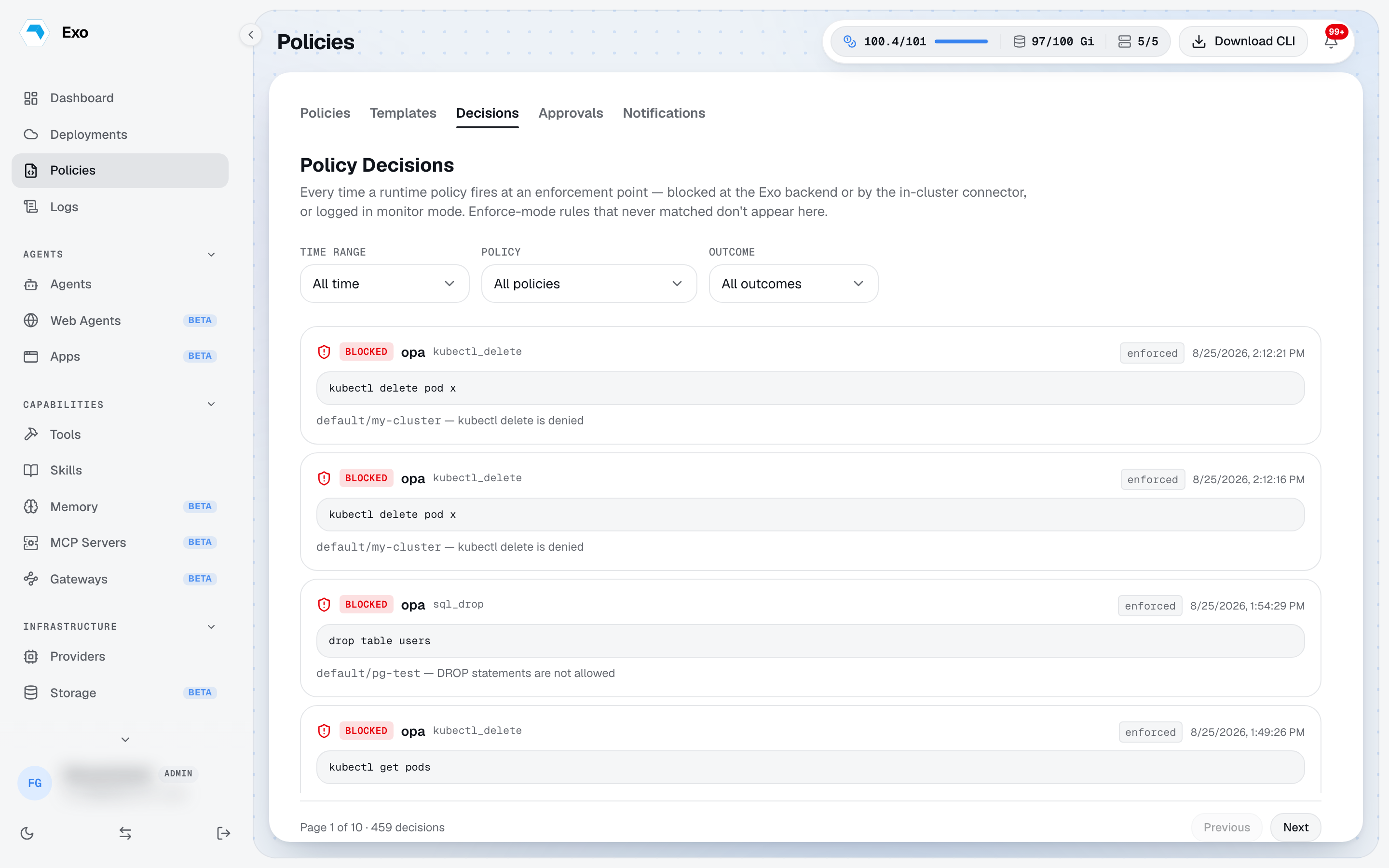
A quick enforce-mode check from the exo CLI, against a kubernetes tool you have added, here named my-cluster:
exo tool exec default/my-cluster -- kubectl get pods
exo tool exec default/my-cluster -- kubectl delete pod x # blocked, rule kubectl_delete
With more than one deployment connected, qualify the ref as deployment/namespace/name.