
Agent
An Agent declares a runtime, a goal, a model, the skills it can use, and when it wakes up. The operator runs one pod per Agent.
An Agent is a Kubernetes object describing a coding or automation agent. The operator runs one pod per Agent (the agentlet plus the runtime CLI), resolves its model credentials, provisions its skills, and fires runs on a schedule or on demand.
Create an agent
There are two ways to create one.
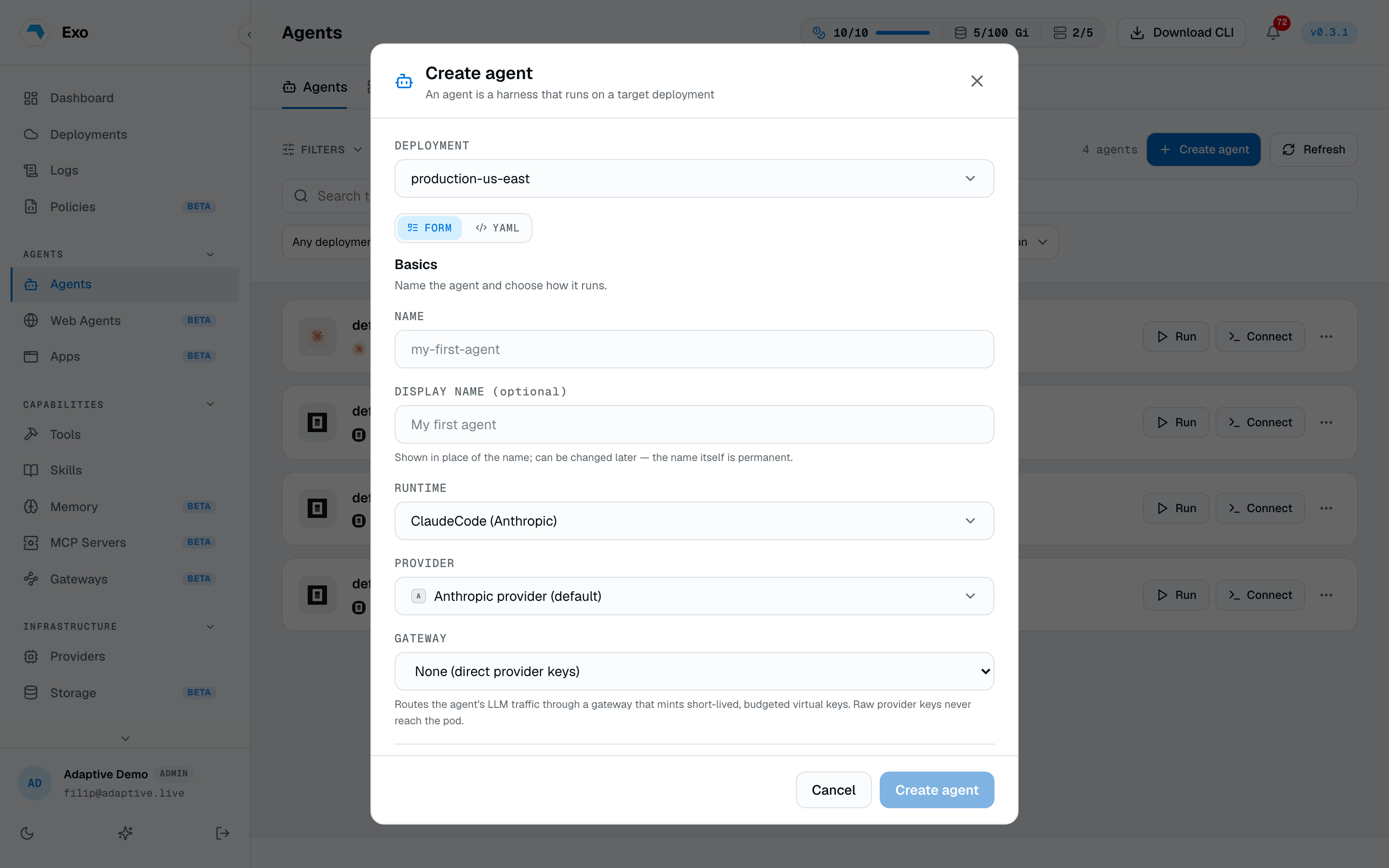
From the dashboard. On the Agents page, or a deployment's detail, click Create agent. Choose the deployment to run it in (it must be online), give it a lowercase DNS-style name, pick a runtime, and write its goal. For OpenCode that's all you need, it runs on a free, keyless model. Claude Code and Codex also need a model provider. Exo creates the agent in your cluster for you, no YAML.
As a Kubernetes object. For GitOps, or anything the form doesn't cover, declare the Agent resource below and apply it with kubectl or your CD tool. The operator reconciles it the same way, so both paths land in the same place.
A sample Agent
1apiVersion: autonomic.sh/v1alpha12kind: Agent3metadata:4 name: triage-bot5 namespace: adaptive6 labels:7 autonomic.sh/agentgroup: support-team8 env: prod9spec:10 runtime: ClaudeCode11 displayName: Issue triage12 phase: Active13 goal:14 inline: |15 Triage incoming GitHub issues: fetch new ones hourly, label, assign.16 model:17 name: claude-opus-4-818 provider: anthropic19 provider:20 name: anthropic-prod21 type: anthropic22 gateway:23 name: shared-gateway24 wakeup:25 enabled: true26 mode: schedule27 schedule: "0 * * * *"28 bootstrap:29 skills:30 - triage-runbook31 mcps:32 - linear33 policies:34 - safe-shell-baselineFields
runtime: the agent CLI that runs in the pod. Picks the image (see Runtimes).displayName: a cosmetic name shown in place ofname, which is immutable. Rename freely without touching the resource identity.- labels on the metadata are matched by locally scoped runtime policies, so labelling an agent
env: prodis enough to bring the production guardrails with it. phase:ActiveorPaused, defaulting toPaused. Review the resolved status, then setActiveto arm.goal:inlinetext or aconfigMapKeyRef.model: the model binding (nameplus a familyproviderlikeanthropicoropenai).provider: the platform-managed provider the credentials come from.namepins a specific integration record;type(anthropic,openai, …) picks that kind's tenant default whennameis omitted, so you don't store a key per agent.agentToken: an escape hatch. A Secret ref holding the runtime's own API key (mapped to its token env var) for when you aren't using a platform-managed provider.
Capabilities
What an agent may do is described by three independent flags rather than a single mode. All default off, so a new agent is both connectable and runnable:
disableShell: no interactive session. Nobody can attach a terminal to it.disableRun: no runs. The Run button disappears, and webhooks and schedules will not fire it.injectGoals: the goal is injected into the session rather than left for the agent to pick up — the deterministic playbook shape.allowUserContext: a Run offers a box for free-text context that applies to that run only.
Runtimes
spec.runtime picks the coding-agent CLI the operator runs in the pod: ClaudeCode, Codex, Gemini, Pi, or OpenCode. Which provider each resolves, per-runtime examples, and image pinning live on Runtimes.
What you can attach
Most of an agent's power comes from what it is wired to. Each of these is editable after creation, from the dashboard or the resource:
| Attachment | Field | What it gives the agent |
|---|---|---|
| Skills | bootstrap.skills | Reusable instruction bundles, materialised into the runtime's instruction files at session start — an edited skill is live on the next run, no redeploy. |
| MCP servers | bootstrap.mcps | Remote tool servers. The URL and credentials are rendered into the runtime's MCP config at connect time, never stored in the resource. |
| Policies | bootstrap.policies | Runtime guardrails the agent is bound by, enforced at the control plane and inside the pod. |
| Memories | bootstrap.memories | Durable versioned context, read at session start and written back. |
| File systems | filesystems | Persistent volumes mounted into the pod, shared across agents and surviving restarts. |
| Gateway | gateway | Route model traffic through an LLM gateway for metering and budgets instead of direct provider keys. |
| Web agents | webAgentRefs | A browser the agent can drive, over MCP. |
| Schedule | wakeup | Fire runs on cron, a phrase, or once at a fixed time. |
Templates
A configuration worth repeating can be saved as an agent template: runtime, goal, capability flags, provider, skills, policies, MCP servers, and web-agent bindings, minus the name. Creating an agent from a template fills in everything you do not override — including from the API and CLI, not just the modal. Templates are tenant-scoped records, not Kubernetes objects. A built-in library of ready-made workflow agents sits alongside your own templates; start from one and adjust rather than assembling from scratch.
Pause, restart, delete
- Pause sets
spec.phase: Paused: the resident pod is torn down and scheduled wakeups stop. Resuming brings it back. This is the safe stop. - Restart deletes the resident pod and lets the reconciler recreate it — pod specs are immutable, so recreating is the restart. In-flight runs are separate pods and are left alone.
- Delete removes the agent; owner references tear down its pod, run config, and secrets. Force delete also purges the dashboard row when the deployment is offline or the operator is unresponsive.
Status
kubectl get agents surfaces two status columns the controller writes: .status.phase and .status.ready. The rest of .status is free-form (the CRD preserves unknown fields), so the reconciler can add detail without a schema bump. Run kubectl describe agent <name> to read the full object when a run won't fire.