
SSO · SAML & OIDC
Sign in to Exo through your identity provider. Register Exo as an app in the IdP, enter the provider values in the dashboard, and the browser sign-in flow mints the same User JWT a password login would.
Exo does browser single sign-on over SAML 2.0 and OIDC (OpenID Connect). Configure both per tenant under Dashboard → Identity providers, with the idp:write permission. Use whichever protocol your IdP exposes. Okta, Microsoft Entra, Google, Auth0, Ping, and Keycloak all support one or both.
How sign-in works
A user enters their work email on the login page. Exo looks up which provider serves that domain and bounces the browser to your IdP. The IdP authenticates them and redirects back with an assertion (SAML) or an id_token (OIDC). Exo validates it, creates or updates the user, applies their group memberships, and issues a User JWT, the same token a password login mints. There's no separate SSO session store. The JWT is the session.
Add a provider
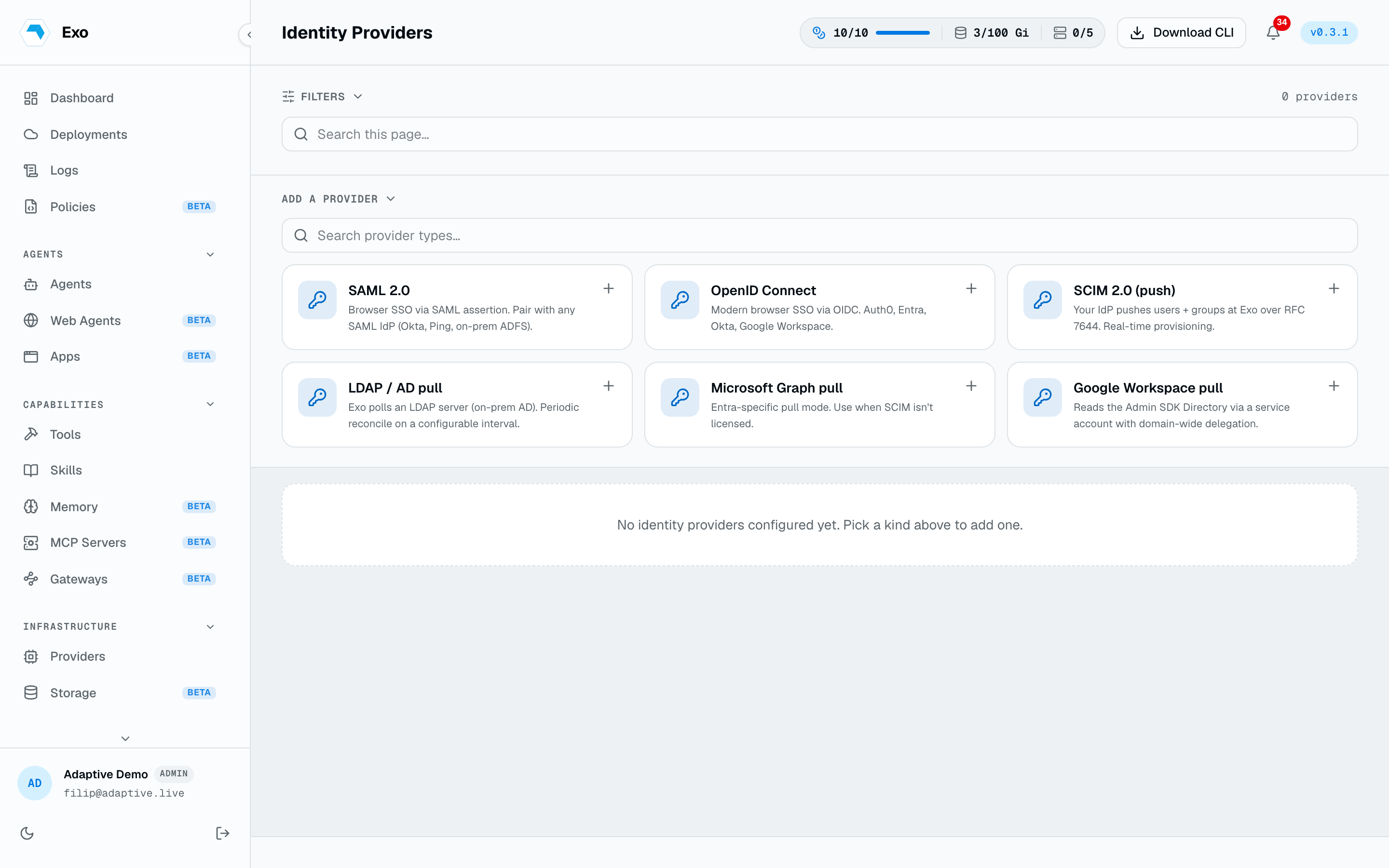
Open Identity providers, choose SAML 2.0 or OIDC, and give it a display name (what users see on the login page). The editor has a form view for the common fields and a YAML view for the full config. Secrets (client secrets, signing keys) are write-only: once saved they never render back, and leaving a secret field blank on edit keeps the stored value.
Configure SAML 2.0
Exo is the service provider (SP). Create the IdP side first so you have the SSO URL, entity ID, and signing certificate to paste in. Exo publishes its SP metadata for the IdP to consume:
1SP metadata GET /api/v1/sso/saml/{idp-id}/metadata2ACS (reply) POST /api/v1/sso/saml/{idp-id}/acs3SP entity ID https://exo/sp/{idp-id} (override if your IdP needs a URL)Then fill the Exo side:
| Field | Maps to | Notes | Example |
|---|---|---|---|
| IdP SSO URL | sso_url | Where Exo sends the auth request | https://acme.okta.com/app/exo/abc123/sso/saml |
| IdP entity ID | entity_id | Issuer of the assertion | http://www.okta.com/exkabc123 |
| IdP signing cert | x509_cert | PEM, used to verify the assertion | -----BEGIN CERTIFICATE----- MIIC… |
| SP entity ID | sp_entity_id | Optional; defaults to https://exo/sp/{id} | https://exo/sp/{id} |
| ACS URL | acs_url | Optional; defaults to the /acs route above | https://exo.acme.com/api/v1/sso/saml/{idp-id}/acs |
| Email attribute | attribute_mapping.email | Claim carrying the user's email | email |
| Name attribute | attribute_mapping.name | Claim carrying display name | displayName |
| Groups attribute | attribute_mapping.groups | Multi-valued claim of group names | groups |
Configure OIDC
Register Exo as a web app in your IdP, set the redirect URI to the callback below, and copy the client credentials in. Exo reads the IdP's /.well-known/openid-configuration from the issuer, so you supply the issuer URL, not every endpoint.
GET /api/v1/sso/oidc/{idp-id}/callback| Field | Maps to | Notes | Example |
|---|---|---|---|
| Issuer URL | issuer | Base URL; Exo fetches the discovery doc | https://login.microsoftonline.com/acme.onmicrosoft.com/v2.0 |
| Client ID | client_id | From the IdP app registration | 12345678-9abc-def0-1234-56789abcdef0 |
| Client secret | client_secret | Write-only after save | wxy8Q~… |
| Redirect URI | redirect_uri | Must equal the callback registered above | https://exo.acme.com/api/v1/sso/oidc/{idp-id}/callback |
| Scopes | scopes | Optional; defaults to openid email profile groups | openid email profile groups |
| Email claim | email_claim | Optional; defaults to "email" | email |
| Name claim | name_claim | Optional; defaults to "name" | name |
| Groups claim | groups_claim | Optional; defaults to "groups" | groups |
The flow uses Authorization Code with PKCE. Exo validates the id_token's issuer, audience, and expiry, then reads email, name, and groups from the claims you named above.
Default provider & discovery
Mark one provider Default for SSO discovery so users who land on the login page without a matched email still get a sign-in button. Email discovery is rate-limited and nonce-protected against account enumeration. Nothing to configure there.
Groups & roles
Every group name in the assertion or token reconciles into an Exo group on each sign-in, but groups don't carry roles: a user's role is assigned directly, one per user, and first-time SSO users land as Member. Groups scope access instead; use them as principals on per-agent access lists. See Roles & permissions. To keep the full directory in sync between logins, including deactivations, pair SSO with SCIM or directory sync.
Test & roll out
Save the provider disabled first, use the row's Test button to check the config, then enable it and run a real sign-in end to end. Enable is reversible: toggling a provider off stops new SSO logins through it at once, without deleting the config.