
Access control
Who can see and connect to each agent. RBAC decides what a user may do at all; ABAC then narrows access per request — per-agent access lists, which scope sensitive agents to named people, teams, or roles, are one example.
Access to an agent passes two checks, one from each access-control model Exo uses. RBAC (role-based) asks whether the user holds the right permission (e.g. agents:read, agents:invoke) — a property of the user's role, regardless of which agent. ABAC (attribute-based) then decides from attributes of the specific request. Per-agent access lists are one such ABAC policy: they ask whether, for this agent, the user is on the list. Both must pass.
Open vs restricted
- Open: an agent with no access-list entries is visible to anyone with
agents:read. - Restricted: add the first principal and the agent becomes visible only to listed users, teams, and roles. Remove the last entry and it flips back to open.
Principals are user, team, or role. A user sees a restricted agent if they're granted directly, are a member of a granted team, hold a granted role, or hold agents:admin (which bypasses the list). Agents a user can't see return 404, not 403, so their existence doesn't leak.
Creation forms ask up front: Private starts the access list with just you, Shared creates the resource open. A resource's creator always keeps full access to it either way.
Access levels
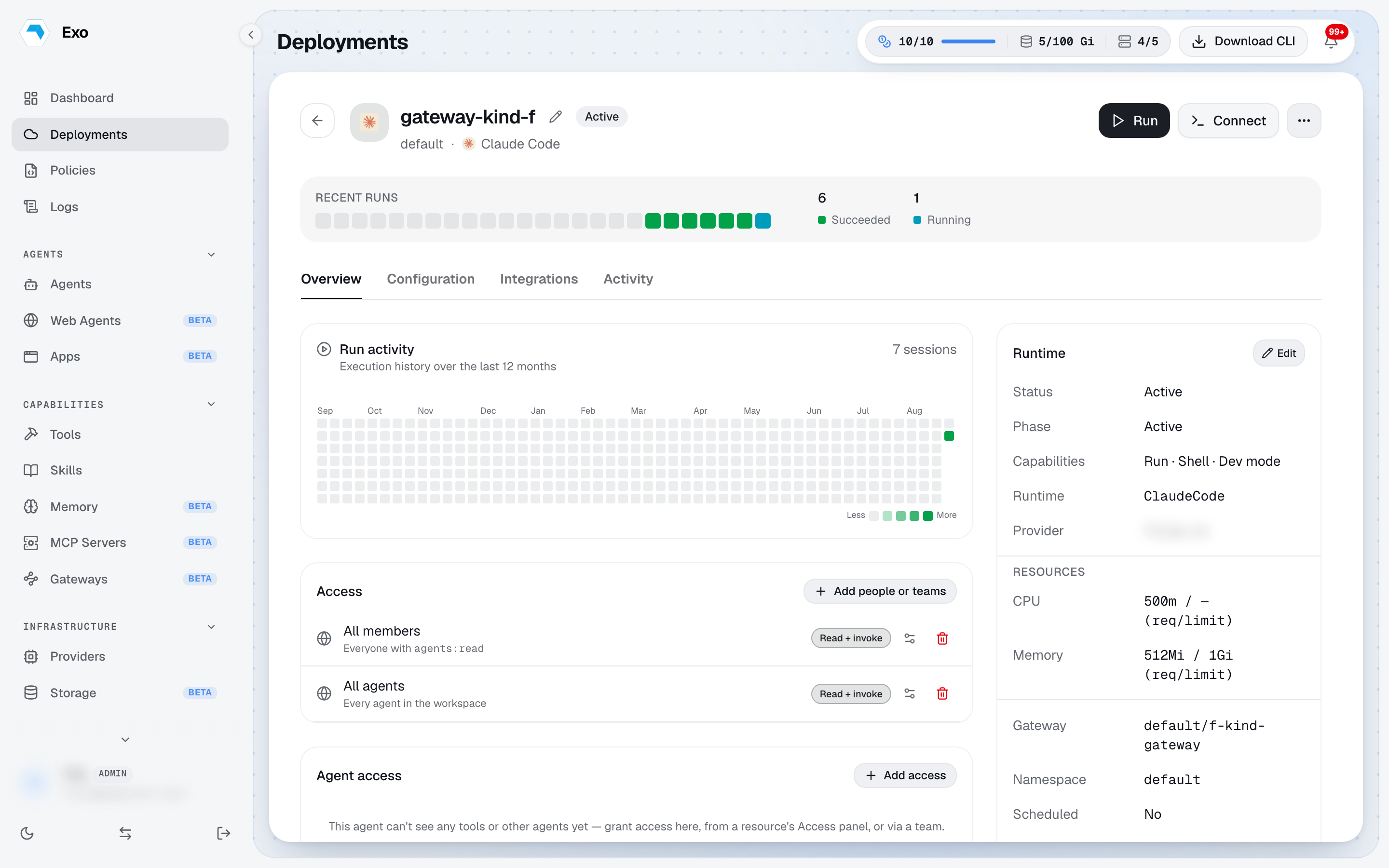
Each grant carries three independent levels. None implies another; a principal ends up with everything granted across every entry that matches them.
| Level | What it admits |
|---|---|
read | List the resource, open its detail page, see it in pickers. Discovery, not use. |
write | Change it: edit, delete, rename, enable or disable, pause. |
invoke | Use it: run, connect, exec, chat, stream, proxy. |
New grants start as read-only; add invoke for anyone who should actually use the resource, including agents calling a tool. Levels never widen RBAC: the role permission is still required, the level narrows what it reaches.
Grant & revoke
Manage the list from the dashboard's Access tab. Each grant adds one principal with its levels; each revoke removes one. To reopen an agent, revoke its last entry. This requires agents:admin.
Require MFA
Any agent, tool, or file system can additionally demand a fresh MFA check before it is used: the Require MFA to invoke toggle at the bottom of the Access panel. When the workspace already enforces MFA tenant-wide the toggle shows as required and cannot be loosened per resource.
Permission matrix
The full RBAC catalogue — every key Exo's built-in handlers gate, mirroring model.SystemPermissions — against the two seeded roles. ✓ means the role holds that permission. Admin carries the entire catalogue (rebuilt from the system list on every release, so it never misses a new key); Member is the narrow read-plus-invoke seed. Tenant-authored roles mix and match any of these, and custom permissions add rows your own code gates on.
| Permission | What it gates | Admin | Member |
|---|---|---|---|
users:read | See team members & pending invitations | ✓ | — |
users:invite | Invite new members | ✓ | — |
users:write | Edit or remove members | ✓ | — |
roles:read | View roles & their assignments | ✓ | — |
roles:write | Create/edit roles and assign permissions | ✓ | — |
idp:read | View identity providers (SSO / SCIM) | ✓ | — |
idp:write | Configure identity providers | ✓ | — |
teams:read | View tenant-authored teams | ✓ | — |
teams:write | Create/edit teams & membership | ✓ | — |
agents:read | See agents (subject to access lists) | ✓ | ✓ |
agents:invoke | Attach to and run agents | ✓ | ✓ |
agents:write | Edit the Agent CR | ✓ | — |
agents:admin | Manage per-agent access lists; bypass ABAC visibility | ✓ | — |
deployments:read | View Exo Operator deployments | ✓ | ✓ |
deployments:write | Manage deployments & tokens | ✓ | — |
deployments:delete | Delete deployments | ✓ | — |
sessions:read | Inspect session transcripts & tool calls | ✓ | ✓ |
sessions:write | Checkpoint / resume sessions | ✓ | — |
audit:read | Read the audit streams | ✓ | ✓ |
audit:export | Export the audit streams | ✓ | — |
events:read | Read the platform activity / event stream | ✓ | — |
sandboxes:read | View code sandboxes | ✓ | ✓ |
sandboxes:write | Create / edit sandboxes | ✓ | — |
sandboxes:invoke | Run code sandboxes | ✓ | ✓ |
sandboxes:delete | Delete sandboxes | ✓ | — |
tools:read | View the Cluster Tools catalogue | ✓ | ✓ |
tools:write | Manage Cluster Tools | ✓ | — |
policies:read | View Runtime Policies | ✓ | ✓ |
policies:write | Manage Runtime Policies | ✓ | — |
policies:delete | Delete Runtime Policies | ✓ | — |
approvals:read | See pending approval requests | ✓ | ✓ |
approvals:decide | Approve or deny held commands | ✓ | — |
guardrails:read | View guardrails | ✓ | ✓ |
guardrails:write | Manage guardrails | ✓ | — |
integrations:read | View Slack / Jira / Adaptive integrations | ✓ | — |
integrations:write | Manage integrations | ✓ | — |
oauth_apps:read | View OAuth Apps | ✓ | — |
oauth_apps:write | Manage OAuth Apps | ✓ | — |
providers:read | View LLM provider gateways | ✓ | — |
providers:write | Manage LLM providers & credentials | ✓ | — |
tenant:read | View tenant settings | ✓ | — |
tenant:write | Edit tenant settings | ✓ | — |
skills:read | View the Skills catalogue | ✓ | ✓ |
skills:write | Manage Skills | ✓ | — |
mcp:read | View MCP servers | ✓ | — |
mcp:write | Manage MCP servers | ✓ | — |
claw:read | View Claw | ✓ | — |
claw:write | Manage Claw | ✓ | — |
memory:read | View agent memory | ✓ | — |
memory:write | Manage agent memory | ✓ | — |
log_storage:read | View log-storage config | ✓ | — |
log_storage:write | Manage log-storage config | ✓ | — |
Visibility & permissions
Grant and revoke are admin-only; each records who granted access (granted_by) and when (granted_at). See Roles & permissions for the permission catalogue and how teams differ from IdP groups.